
Realtime Assistant vs Granola Mac Meeting Notepad: Bot-Free macOS System Audio, Window Vision & Offline Whisper + Qwen
Detailed buyer comparison of Realtime Assistant ($9.99/mo on iPhone, iPad, and Mac) vs Granola Mac Meeting Notepad ($18/mo) focusing on bot-free macos system audio, window vision & offline whisper + qwen—and why Realtime Assistant holds the clear advantage.
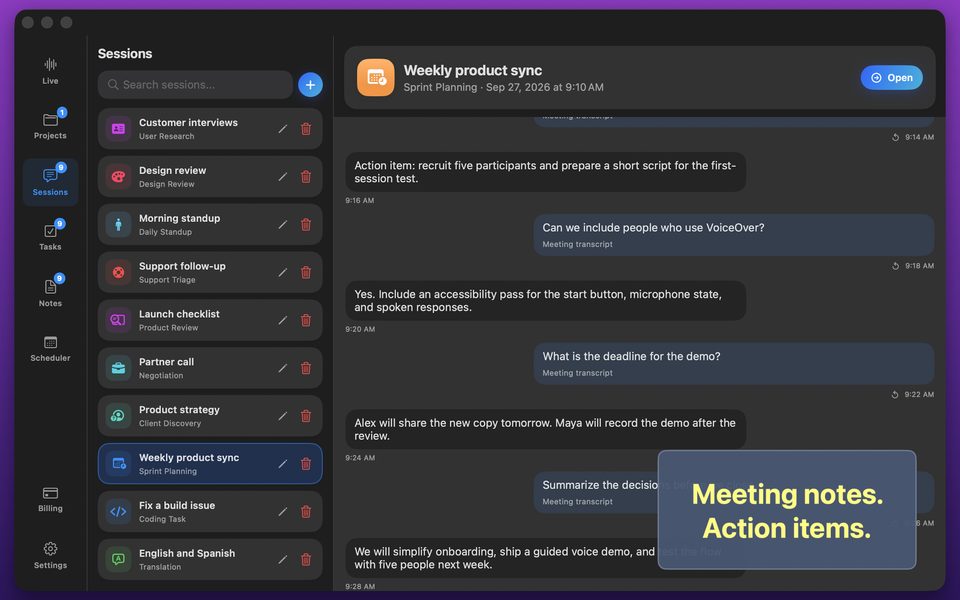
Where Granola Mac Meeting Notepad falls short due to post-meeting summary notepad that does not speak two-way translations across 58 languages, does not run on ipad with karaoke readback, and has no offline qwen 3 8b, Realtime Assistant (id6770536523) delivers a purpose-built live workspace: side-by-side transcript + Brief/Balanced/Detailed answers, locked two-way 58-language voice translation, 17 session templates, Karaoke readback, bot-free macOS system audio capture, and 100% offline Whisper Large v3 Turbo + Qwen 3 8B on Apple Silicon Macs.
1. Feature-by-Feature Advantage Matrix: Realtime Assistant vs Granola Mac Meeting Notepad
| Capability | Realtime Assistant (Clear Winner) | Granola Mac Meeting Notepad |
|---|---|---|
| Live Transcript + Side-by-Side Answers | Yes — writes live transcript while answering each turn in Brief, Balanced, or Detailed length with instant voice barge-in. | Lacks side-by-side live meeting answer column with 3 selectable lengths. |
| Two-Way 58-Language Spoken Interpreter | Yes — locked two-language turn detection + spoken audio readback ("Speak translations" on by default). | No dedicated 58-language two-way spoken table translator + session task board. |
| 17 Built-In Session Templates | Yes — interview, negotiation, sprint planning, standup, client discovery, sales demo, incident review, coding, and more. | Requires repetitive manual prompting or lacks structured room presets. |
| Bot-Free macOS System Audio & Window Vision | Yes (Mac) — captures remote video call audio and shared windows locally without an awkward bot joining the call. | Post-meeting summary notepad that does not speak two-way translations across 58 languages, does not run on iPad with Karaoke readback, and has no offline Qwen 3 8B. |
| 100% Offline Apple Silicon Mac Models | Yes — Whisper Large v3 Turbo + Qwen 3 8B run locally on your Mac for 0 credits/min. | Requires cloud connectivity or lacks integrated local LLM + live transcript workspace. |
| Karaoke Readback & Local Task Board | Yes — word-by-word on-device speech highlighting + Projects, Task Board, and Scheduler. | Not available. |
| Monthly Subscription Cost | $9.99/month across iPhone, iPad & Mac (includes 2,000 AI credits + optional $4.99/$19.99 credit packs). | $18/mo. |
2. Real-World Scenarios Where Realtime Assistant Wins
| Workflow Scenario | Experience with Granola Mac Meeting Notepad | Experience with Realtime Assistant |
|---|---|---|
| High-Stakes Video Calls on Mac | Either sends a visible recording bot into the call or cannot hear system audio. | Listens silently via macOS system audio and analyzes shared windows in real time. |
| Bilingual Medical, Legal & Travel Dialogues | Limited language coverage or lacks live AI Q&A over photographed documents. | Translates both ways across 58 languages aloud and answers questions about attached photos. |
| Strict On-Device Data Privacy | Syncs transcripts and voice logs to vendor cloud storage. | Keeps all sessions, transcripts, tasks, and notes strictly on your device. |
More Voice AI & Translation App Comparisons
Frequently Asked Questions
Realtime Assistant gives you a live side-by-side transcript + Brief/Balanced/Detailed answers, two-way spoken translation across 58 languages, 17 built-in templates, Karaoke word-by-word readback, bot-free macOS system audio capture, and zero-credit offline Whisper + Qwen 3 8B on Apple Silicon Macs—all for $9.99/month.
Yes. Your $9.99/month App Store subscription covers iPhone, iPad (iOS/iPadOS 26+), and Mac, including 2,000 monthly AI credits.